
How to add a google tour to your timeline in Facebook
1 - Go to your tour in the google maps page, and get the Short URL:
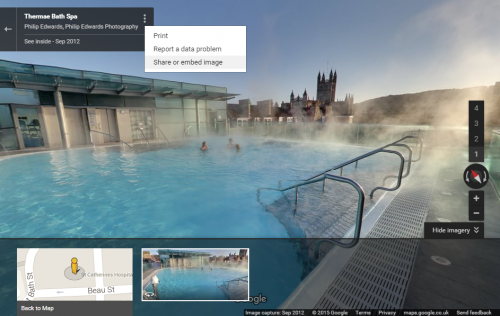
1. Click on the vertical ellipsis icon
Warning: Use of undefined constant id - assumed 'id' (this will throw an Error in a future version of PHP) in /home/sites/6a/e/e476ae0763/public_html/business/wordpress/wp-content/plugins/php-execution-plugin/includes/class.php_execution.php(273) : eval()'d code on line 1
 at the top of the tour to access menu.
2. Select Share and Embed image.
Warning: Use of undefined constant id - assumed 'id' (this will throw an Error in a future version of PHP) in /home/sites/6a/e/e476ae0763/public_html/business/wordpress/wp-content/plugins/php-execution-plugin/includes/class.php_execution.php(273) : eval()'d code on line 5
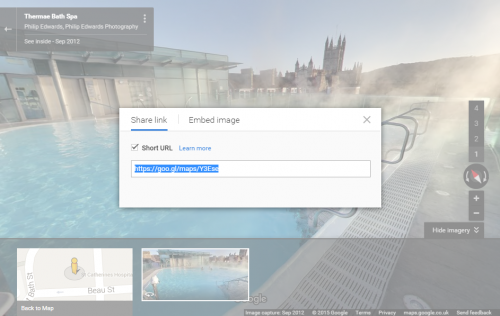
3. Select Share link option.
4. Now copy the URL so you can paste it into your website.
Warning: Use of undefined constant id - assumed 'id' (this will throw an Error in a future version of PHP) in /home/sites/6a/e/e476ae0763/public_html/business/wordpress/wp-content/plugins/php-execution-plugin/includes/class.php_execution.php(273) : eval()'d code on line 10
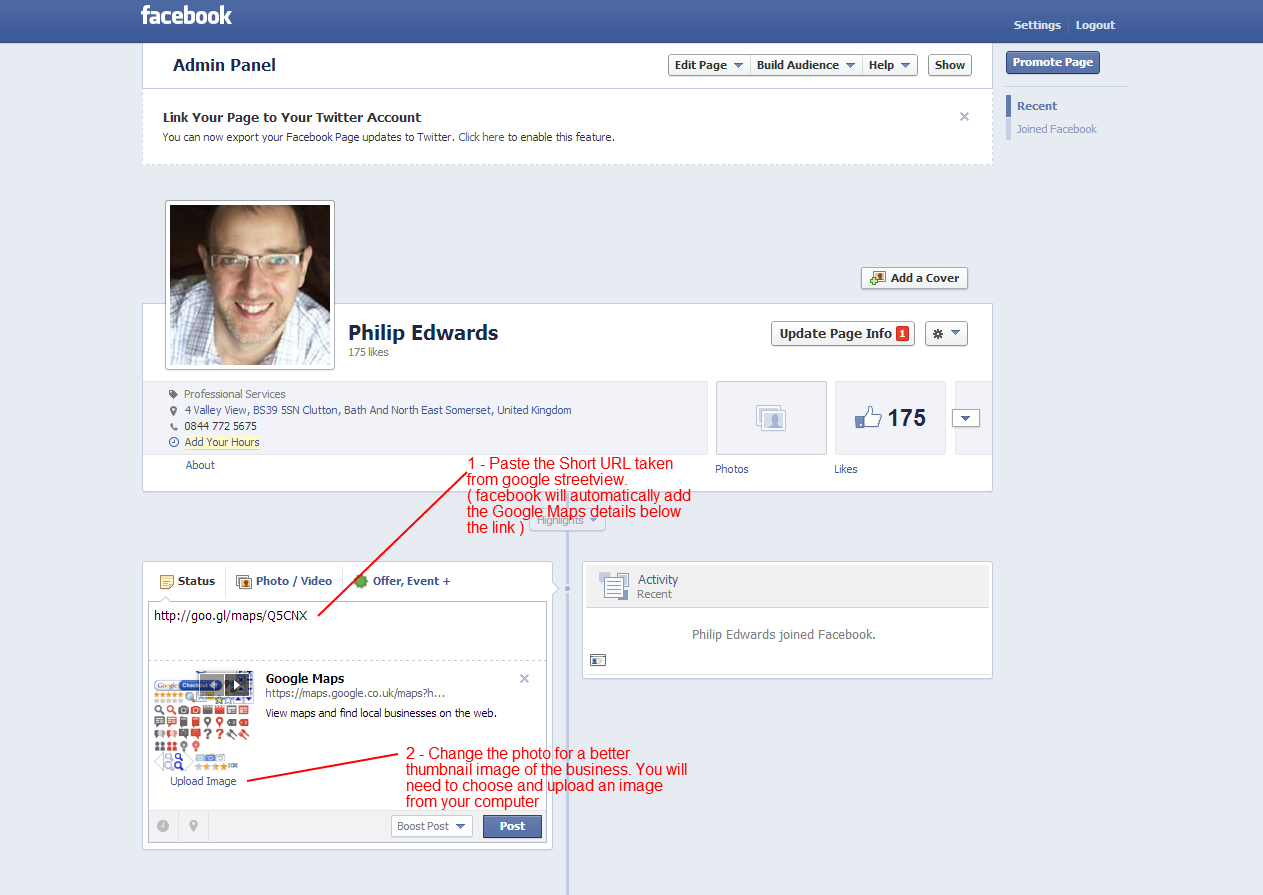
2 - Go to facebook and paste the Short URL in a new post
Go to your facebook page and paste the Short URL you have just copied into a new post in the timeline. Facebook will automatically fetch a thumbnail and information about google maps. You will want to change the thumbnail for something better. You can select upload an image and choose the thumbnail image from your computer (the one you saved in step 1 for example)
Warning: Use of undefined constant id - assumed 'id' (this will throw an Error in a future version of PHP) in /home/sites/6a/e/e476ae0763/public_html/business/wordpress/wp-content/plugins/php-execution-plugin/includes/class.php_execution.php(273) : eval()'d code on line 11
Warning: Use of undefined constant w - assumed 'w' (this will throw an Error in a future version of PHP) in /home/sites/6a/e/e476ae0763/public_html/business/wordpress/wp-content/plugins/php-execution-plugin/includes/class.php_execution.php(273) : eval()'d code on line 11
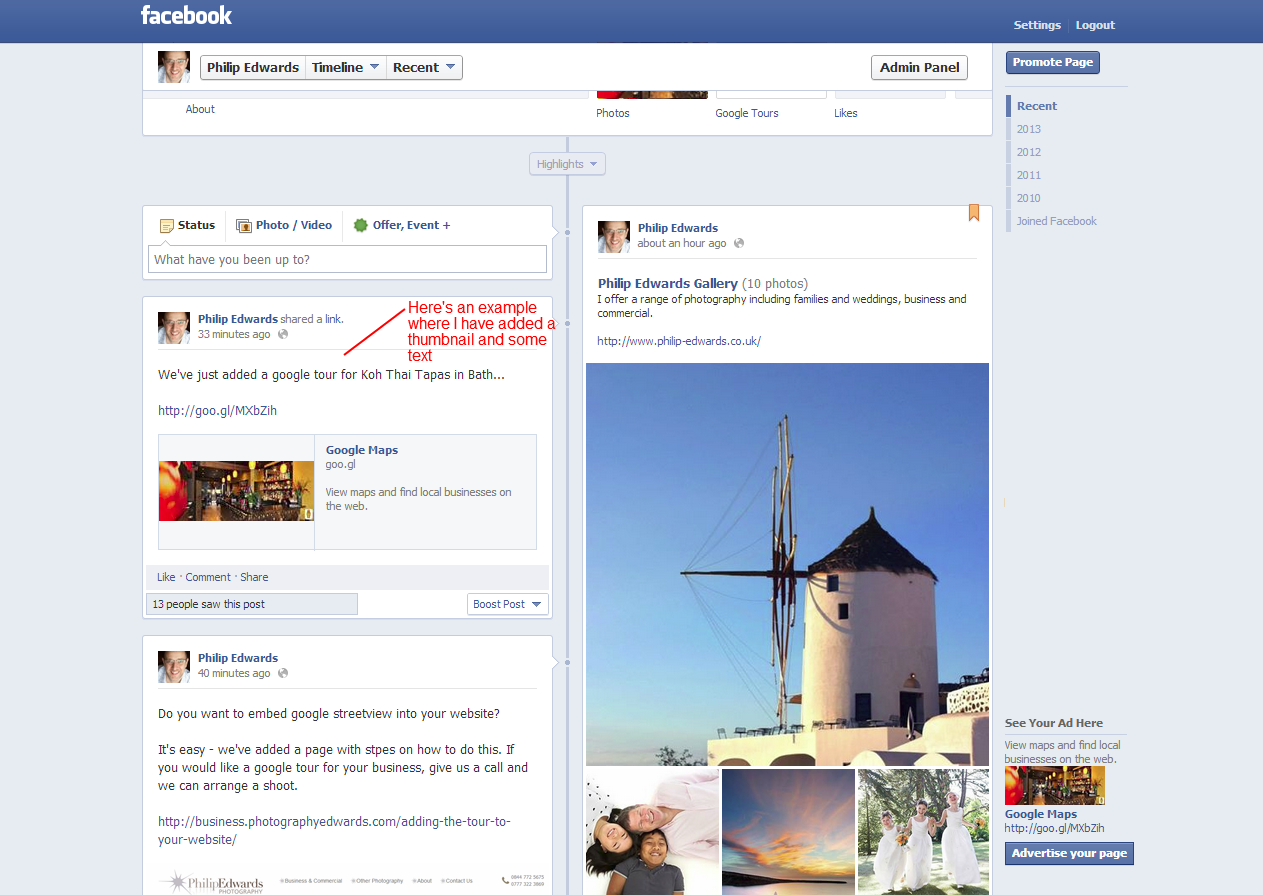
2 - Final Result
Once you click post, you should finish with a post similar to this http://www.facebook.com/photographyedwards:
Warning: Use of undefined constant id - assumed 'id' (this will throw an Error in a future version of PHP) in /home/sites/6a/e/e476ae0763/public_html/business/wordpress/wp-content/plugins/php-execution-plugin/includes/class.php_execution.php(273) : eval()'d code on line 17
Warning: Use of undefined constant w - assumed 'w' (this will throw an Error in a future version of PHP) in /home/sites/6a/e/e476ae0763/public_html/business/wordpress/wp-content/plugins/php-execution-plugin/includes/class.php_execution.php(273) : eval()'d code on line 17