


How to Customise and Get the Code to Embed a Google Tour in your Website or Blog
You and your clients can embed Google Maps virtual tours using the Google Maps Embed API for free, with no quotas or request limits. Feel free to check out more information about how to use this API here.
You can also find the html code for embedding a tour on Google Maps:
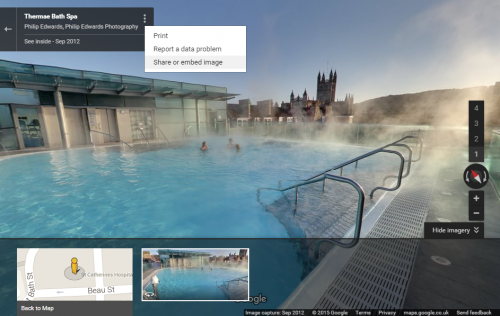
1. Click on the vertical menu icon
Warning: Use of undefined constant id - assumed 'id' (this will throw an Error in a future version of PHP) in /home/sites/6a/e/e476ae0763/public_html/business/wordpress/wp-content/plugins/php-execution-plugin/includes/class.php_execution.php(273) : eval()'d code on line 7
 at the top of the tour to access menu. (If you cant see this menu, you may not be in google maps and may need to try accessing the tour from google maps)
2. Select Share and Embed image.
Warning: Use of undefined constant id - assumed 'id' (this will throw an Error in a future version of PHP) in /home/sites/6a/e/e476ae0763/public_html/business/wordpress/wp-content/plugins/php-execution-plugin/includes/class.php_execution.php(273) : eval()'d code on line 11
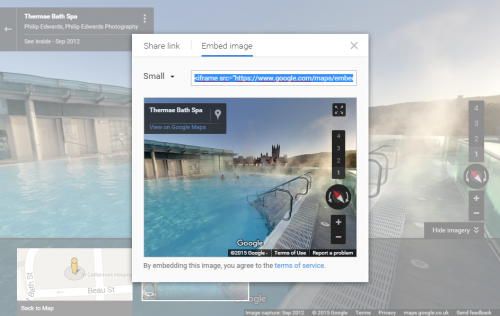
3. Select Embed image option.
4. Select the size of the desired imagery. (you can also customise to a specific size)
5. Now copy the embed script so you can paste it into your website or iFrame/embed gadget.
Warning: Use of undefined constant id - assumed 'id' (this will throw an Error in a future version of PHP) in /home/sites/6a/e/e476ae0763/public_html/business/wordpress/wp-content/plugins/php-execution-plugin/includes/class.php_execution.php(273) : eval()'d code on line 17
Manage Your Google Places Page
On your google places page, you will see all the information that you as a user can edit and manage. For example you can fill in details such as opening hours, address, websites. You can also upload images yourself to this page. You can also change the location of your google map marker if it is in the wrong place. In order to manage this page, you need to click on the link 'Manage this page'. You will need to login to your google account to manage the page. ( The google places page is a widely used service from google and you can find much information on the internet from other users about these pages and tips on how to manage them. )
If you have never claimed and set up this page before, you will need to create a google account and then follow the instructions from this page to claim this page. ( If you are creating a new google account, google suggest that you create an account with a name and password where the account ownership and management can be easily passed onto a new user. This is to avoid future complications if there are staff changes or new ownership of a business. )
You can also share this page with your visitors and ask them to add reviews for your services. This is a very good way of enhancing your online content.
For more information about this service from google, please visit:
If you have a problem with your google places listing, you could have a look at the following page:
Please Leave me a Review
If you are happy with my service, Please leave me a review on Facebook and Google. For example, please mention what features of the photography you like, why you choose to use us and how you think it will help your business.
Many thanks, Philip.