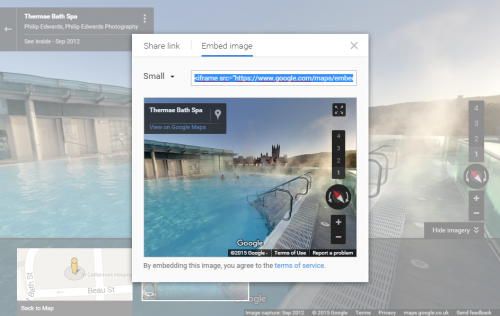


How to Customise and Get the Code to Embed a Google Tour in your Website or Blog
You and your clients can embed Google Maps virtual tours using the Google Maps Embed API for free, with no quotas or request limits. Feel free to check out more information about how to use this API here.
You can also find the html code for embedding a tour on Google Maps:
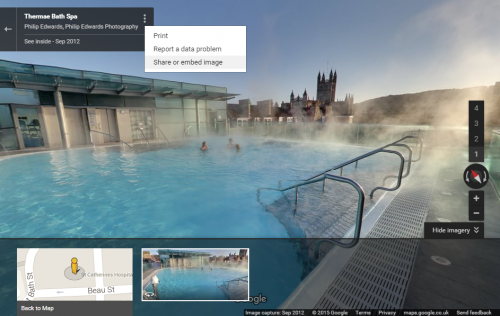
1. Click on the vertical menu icon
Warning: Use of undefined constant id – assumed ‘id’ (this will throw an Error in a future version of PHP) in /home/sites/6a/e/e476ae0763/public_html/business/wordpress/wp-content/plugins/php-execution-plugin/includes/class.php_execution.php(273) : eval()’d code on line 7
 at the top of the tour to access menu. (If you cant see this menu, you may not be in google maps and may need to try accessing the tour from google maps)
2. Select Share and Embed image.
Warning: Use of undefined constant id – assumed ‘id’ (this will throw an Error in a future version of PHP) in /home/sites/6a/e/e476ae0763/public_html/business/wordpress/wp-content/plugins/php-execution-plugin/includes/class.php_execution.php(273) : eval()’d code on line 11
3. Select Embed image option.
4. Select the size of the desired imagery. (you can also customise to a specific size)
5. Now copy the embed script so you can paste it into your website or iFrame/embed gadget.
Warning: Use of undefined constant id – assumed ‘id’ (this will throw an Error in a future version of PHP) in /home/sites/6a/e/e476ae0763/public_html/business/wordpress/wp-content/plugins/php-execution-plugin/includes/class.php_execution.php(273) : eval()’d code on line 17